FREE GUIDE
How to connect your own domain
By the Acyera team · Updated 4 October 2026
The short answer: buy the domain from a domain company first. Then open your site's Domain page on Acyera, type the domain and press Connect. Add the records the page shows you where you bought the domain, and wait while Google gives your site its secure padlock, usually 15 to 60 minutes. The page checks every step for you and tells you when your site is live.
Every Acyera site already has a free web address. A domain of your own, such as racheal.com, is easier to remember and print on a sign, and it reads as yours alone. Connecting one takes about ten minutes of your time and less than an hour of waiting.
Before you start
- A paid plan. Custom domains are on the Essential plan ($4.99 a month) and above. The free plan keeps its free address.
- A domain you have bought. Typing a name on Acyera does not buy it. A domain costs about $10 to $15 a year from a company such as Namecheap, GoDaddy or Cloudflare, or from a local seller for endings such as .ug or .co.ke. How much does a website cost? compares the prices.
- Your sign-in for the company you bought it from. That is where you add the records in step 3.
Step 1: type your domain and press Connect
In your Acyera dashboard, open Sites and press Domain next to your site. Type the domain exactly as you bought it, for example racheal.com, without www or https, and press Connect.
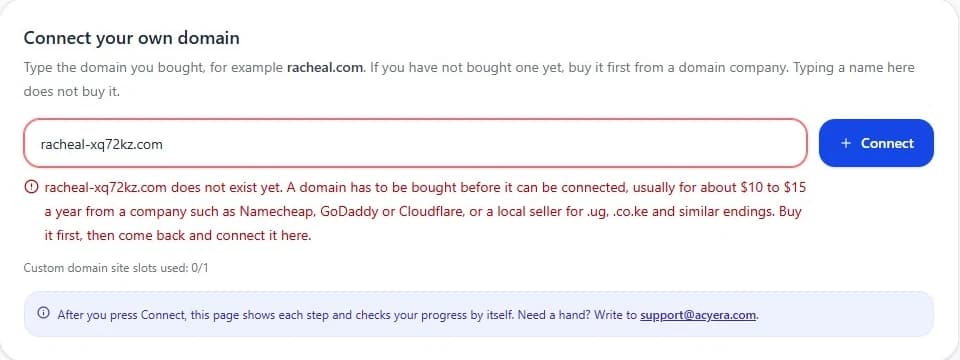
Acyera first checks that the domain exists. If nobody has bought it yet, the page says so straight away, so you never wait for something that cannot happen.
Step 2: get your records
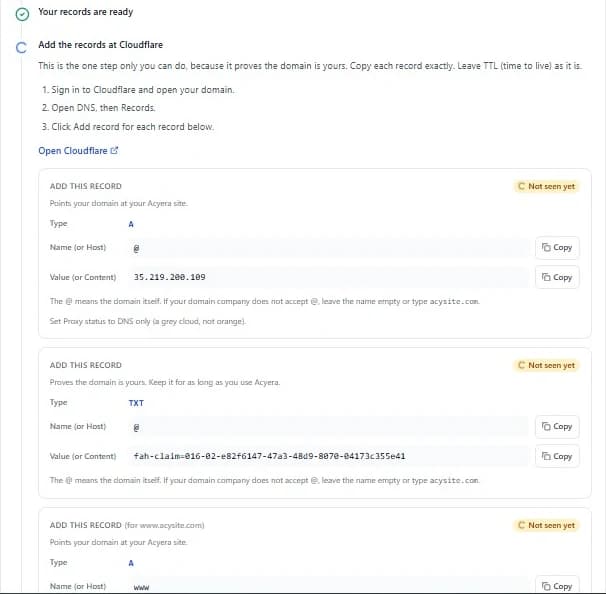
Within about a minute the page shows a short list of records. These are small settings that point your domain at your Acyera site and prove the domain is yours. Each one has a Copy button. The page also names the company that holds your domain's settings and lists the clicks for that company.
You connect the main domain, and the www form (www.racheal.com) is set up with it. Its records are labelled "for www", so visitors who type either one reach your site.
Step 3: add the records where you bought the domain
This is the one step only you can do, because only the owner of a domain can change its settings. That is also how Acyera knows the domain is really yours: nobody can connect your domain to their site.
- Sign in where you bought the domain and open its DNS settings. They may be called DNS, Manage DNS, DNS records or Zone Editor.
- For each record on the Acyera page, add a new record with the same Type, Name and Value. Use the Copy buttons so nothing is mistyped.
- Where the name is @, it means the domain itself. If your company does not accept @, leave the name empty or type your domain.
- Leave TTL (time to live) as your company sets it.
- On Cloudflare, set Proxy status to DNS only, a grey cloud, not orange.
- If a record on the page says Delete this record, remove that old record. It sends visitors to a previous website.
Quotes are fine. Some companies show a TXT value inside quotation marks after you save it. That is normal and does not need changing. Do not touch other records you already have, such as the ones for your email.
Step 4: wait for the padlock
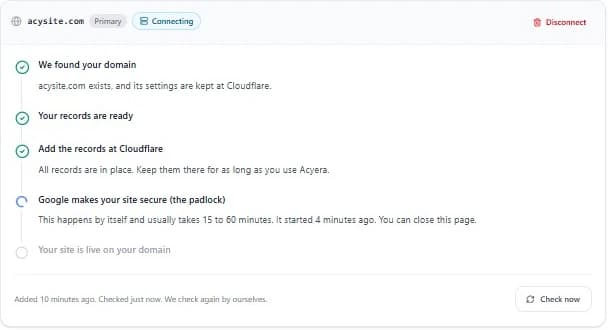
Once your records are in place, Google gives your site its security certificate, the padlock that shows next to the address. This happens by itself and usually takes 15 to 60 minutes. You can close the page. It checks again by itself every time you open it, and shows Live the moment your site opens on your domain.
Now and then the hosting is slow to notice a new domain. If that happens, Acyera restarts the connection for you and the page asks you to change one record to a new value. The others stay as they are.
FREE TO START
Ready to build yours?
Build on Acyera with no account, then save your page to a free account when you are happy with it. The free plan gives you one page on an address like yourname.acyera.com.