FREE GUIDE

How to create a website for your business

By the Acyera team · Updated 4 October 2026

The short answer: a business website needs five things above all: a headline that says what you do and where, your services or products with prices where you can, proof that you are real (photos, reviews, location), one clear way to contact you, and a page that loads fast on a phone. Build it from a template made for your kind of business, publish it, then put the link everywhere your customers already are.

Most small businesses in Uganda, Kenya and Nigeria already sell through WhatsApp, Instagram and word of mouth. A website does not replace those. It gives them one trustworthy address to point to, it shows up when someone searches for what you sell, and it answers the same questions you are asked fifty times a week.

If you have never built a website at all, read How to create a website for the step-by-step mechanics. This guide is about what to put on a business site so it brings in customers.

What every business website needs

Five things decide whether a visitor becomes a customer:

1. A headline that names what you do and where

A visitor decides in a few seconds whether they are in the right place. Say the service and the place in plain words: "Bridal hair and make-up in Lekki", "Car parts delivered across Nairobi". Put your main button right under it.

2. Your services or products, with prices

List what you sell in short blocks: the name, one or two lines on what is included, and a price or a "from" price. Prices are the detail people search for most. If they change a lot, give a range.

3. Proof that you are real

  • Photos of your actual shop, work, team or products.
  • Short reviews from real customers, with their first name and area. Never invent reviews.
  • Your location, ideally with a map, and your opening hours.

4. One clear way to contact you

Make the channel your customers prefer the main button. For most small businesses in East and West Africa that is WhatsApp, and a floating WhatsApp button stays on screen as the visitor scrolls. How to take orders on WhatsApp shows how.

5. A page that works well on a phone

Most visitors arrive on a phone, often on mobile data. Keep the page focused, use photos rather than huge banners, and check the phone preview before you publish. Acyera pages are built for phones and images are resized automatically.

The sections to use, by kind of business

Start from a template made for your kind of business and change it to yours. These are the sections that matter most for each:

Business
Sections that win customers
Main button
Restaurant or café
Menu and prices, hours, map, dish photos
Book or order on WhatsApp
Shop or boutique
Products and prices, delivery, how to pay
Order on WhatsApp
Salon, spa or gym
Treatments and prices, team, hours, photos
Book on WhatsApp
Professional service
What you do, how you work, fees, experience
Request a consultation
School or tutor
Classes, fees, results, location, enrolment
Ask about admission
Church or NGO
Who you are, times and places, how to help
Visit or get involved
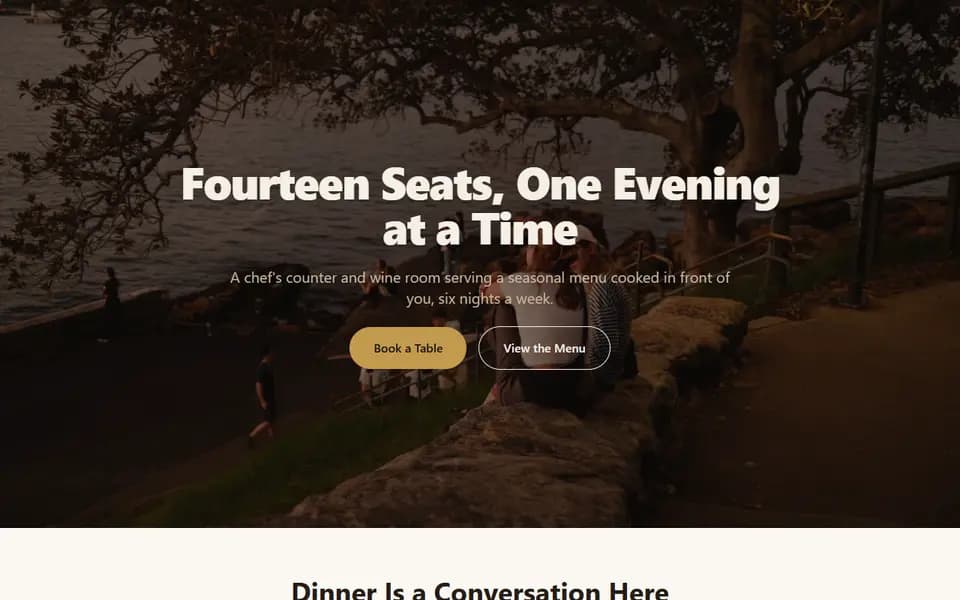
A restaurant website template from Acyera with a full-width photo, the restaurant name and a Book a Table button
The restaurant template, one of the designs in the template gallery.
A spa and wellness website template from Acyera with a calm photo and a Book a Treatment button
The salon and spa template.

Every template is in the template gallery. "Use this template" opens it in the editor in your browser with no account needed.

One page or several?

A single, well-organised page is enough for most small businesses to start, and it is what the free plan gives you. Visitors scroll on a phone happily, and everything is one tap away.

Add pages when you have enough to say that one page would become too long: a separate menu, a page per service, a page of frequently asked questions, a contact page. Paid plans start at $4.99 a month with up to 10 pages per site. See pricing for every plan's limits.

Get it live this week

  1. Day 1: write your headline, your list of services with prices, and your contact details. Pick your five best photos.
  2. Day 2: open a template for your kind of business, or let the AI builder draft the page from a description of your business. Replace every word and photo with yours.
  3. Day 3: preview it on a phone, fix what looks wrong, and ask a customer or friend to try the main button.
  4. Day 4: publish it on a free address like yourname.acyera.com, then share the link on WhatsApp, your social profiles and your Google Business Profile.

After it is live

  • Turn on "Show my site on search engines" in your site settings, and read How to get your business on Google.
  • Answer the questions customers ask most often in a questions section. Each answer saves you a message and can match a search.
  • Update prices and photos when they change. A wrong price costs more trust than a missing one.
  • When the site is bringing in enquiries, connect your own domain. Acyera includes it on every paid plan.

Questions business owners ask

You do not need one to sell, but it helps. A website gives customers one address with your prices, location and reviews, it can be found on Google by people who do not follow you yet, and it makes a small business look established.

Start with one page that covers what you offer, prices, proof, location and contact. When you outgrow it, the usual extra pages are a full price list or menu, a page per main service, questions and answers, and a contact page.

If you can write about your business and take good photos, you can build it yourself with a template in an afternoon and keep it up to date for free. Hire a designer when you need a custom design or have no time at all. How much does a website cost? compares the costs.

Acyera does not take card payments on customer sites. Products can show a price and an add to cart button, and the order reaches you on WhatsApp or by email. You can also link a button to a payment page from a provider you already use. How to accept payments on your website explains both.

Use your own photos, a consistent colour or two, short headlines, real prices and real reviews. Remove every placeholder. A domain of your own also helps once the site is earning its keep.

FREE TO START

Ready to build yours?

Build on Acyera with no account, then save your page to a free account when you are happy with it. The free plan gives you one page on an address like yourname.acyera.com.

Read next

How to take orders on WhatsApp

Turn a website visitor into a WhatsApp conversation and a sale.

Read the guide →

How to get your business on Google

The steps that get a new business seen in search and on the map.

Read the guide →

How to start selling online

Show your products, take orders and get paid, without a big shop system.

Read the guide →