FREE GUIDE
How to start selling online
By the Acyera team · Updated 4 October 2026
The short answer: start small: pick a few products you can deliver reliably, take good photos, set prices that include delivery, and put them on a simple website where each product has a price and an order button. Let orders arrive on WhatsApp or by email, confirm each one personally, and take payment by mobile money, bank transfer, a payment link or cash on delivery. Grow from there.
Selling online does not have to mean a big online store with a card checkout and a warehouse. Most small businesses in East and West Africa that sell online today do it with photos, a price list and WhatsApp. A website makes that look more trustworthy and saves you answering the same questions again and again.
Step 1: decide what to sell first
- Start with five to twenty products you always have in stock and can deliver without trouble.
- Choose items that photograph well and are easy to describe: size, colour, material, what is in the box.
- Check what similar sellers charge, so your prices are in the right range.
Step 2: work out delivery and payment before you list anything
Most failed online orders fail on delivery or payment, not on the product. Decide these first and write them down on your site:
For taking payment online, How to accept payments on your website explains the options, including payment links you can put on a button.
Step 3: photograph and describe each product
- Shoot in daylight, on a plain background, and show the product from more than one side.
- Show size: on a person, in a hand, or next to something familiar.
- Write a short name and one or two lines: what it is, the size or variant, and what is included.
- Show the price clearly. Hidden prices make people leave or send you a message just to ask.
Step 4: put your products on a website
On Acyera, any product photo can become a product with a price. In the image's settings, switch on "Shoppable Overlay", then fill in the product title, the price, the currency symbol and the button text, such as "Add to Cart". Add a cart block to the page and give it your WhatsApp number and the email address where orders should go.
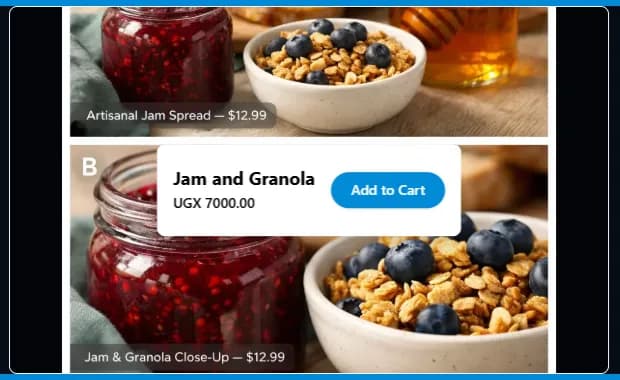
A visitor adds products to the cart, then chooses how to send the order: on WhatsApp, which opens a chat with you with the order already written, or by email, where they give their name and email and the order arrives in your inbox.
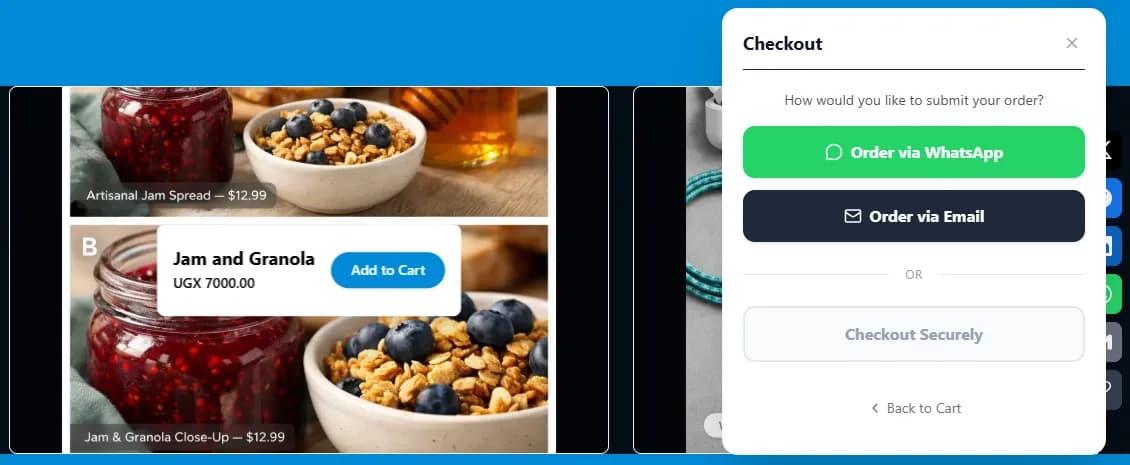
What this does not do: there is no card checkout on customer sites, so customers do not pay on the website itself, and there is no stock counting. You confirm each order, arrange payment and delivery with the customer, and keep track of stock yourself. Selling with products and a cart needs the Essential plan ($4.99 a month) or above. A free site can try it for 21 days after its first publish.
You can try this cart on our live demo site, canvas.acyera.com, where the products have sample prices. The shop template gives you a ready-made shop front to start from, and online store features lists everything included.
Step 5: handle orders like a professional
- Reply to every order quickly, ideally within an hour during business hours.
- Confirm the items, the total including delivery, the delivery address and when it will arrive.
- Send payment details or the payment link, and confirm when payment arrives.
- Tell the customer when the parcel leaves and when to expect it.
- After delivery, ask if all is well and invite a review.
WhatsApp Business makes this easier with quick replies, labels and a catalogue. How to take orders on WhatsApp covers the whole setup.
Step 6: bring buyers to your shop
- Post your products on your WhatsApp status and in relevant groups, with the website link.
- Put the link in your Instagram, Facebook and TikTok profiles, and post product photos regularly.
- Set up a Google Business Profile and make the website visible to search engines. How to get your business on Google shows how.
- Ask every happy customer to share your link with one friend.
Questions people ask
FREE TO START
Ready to build yours?
Build on Acyera with no account, then save your page to a free account when you are happy with it. The free plan gives you one page on an address like yourname.acyera.com.